Recently people have been seeing a massive influx of mobile applications being created by AI where no user will need any coding experience at all to make the application. The idea is sound where any idea you can think of, you can create.
YouTube videos claiming you can clone other mobile apps and make millions, most of the YouTube vids are scams, what they don’t tell you:
1. Development: Apps run via Expo Go during development
2. Custom native code: Only packages included in Expo Go are supported
3. Building standalone apps: I cannot help with creating standalone APK/IPA files or EAS build processes
Once you’ve built your project, you can’t just simply export & download the zip. You must either export to Github or Cursor.
Having the folders and files exported, you can’t bring that project into Android Studio or X-Code.
What this isn’t!
The project structure I create is React Native + Expo, not a native Android Studio project with Java/Kotlin code. To get a standalone Android/IOS app that doesn’t require Expo Go, you would need to:
Run eas build commands (which I cannot assist with)
Contact support for help with the build/submission process
The development environment here is designed for rapid prototyping with Expo Go, not for creating production-ready native builds. The code I write is production-quality React Native code, but the build process to create standalone apps is outside my scope.
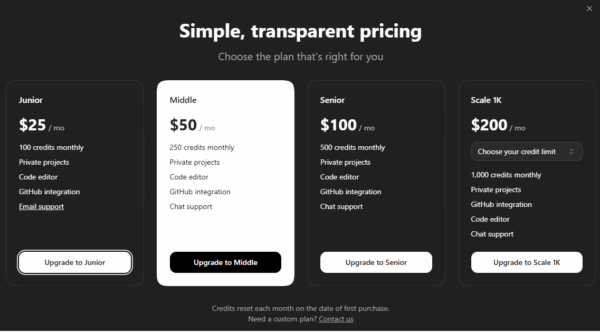
What about costs?
FAQ
GENERAL
Describe your app idea in plain English and Rork generates a working app using React Native and Expo. You can test it instantly on your phone by downloading Rork app for iOS or Expo Go app for Android and scanning the QR code or in your browser. The browser preview is a great way to quickly see how your app feels, but the details may vary and not all native features are available in the browser.
Rork makes a working prototype in minutes just from plain English descriptions. If you want to make a complex mobile app with authentication, database, payments, push notifications, etc. – you’ll currently need engineering help at some point or spend time researching how to implement these features.
Rork makes a beautiful v1 of your app, prototype any number of screens, and easily build AI-powered applications like Chat, Voice Transcription, or Image Generation. Rork apps also store data on the device and integrate with any third-party APIs. However, integrating features like database, authentication, notifications, and payments will take more time to figure out or will require engineering help. We are working on making it super easy for non-technical people to build complex apps.
Yes, you can use Rork for professional purposes.
TECHNICAL
Yes, Rork apps are fully native apps built with React Native and powered by Expo, the #1 cross-platform framework that powers Discord, Shopify, Coinbase, Instagram, and nearly 30% of top 100 apps on the App Store. They work on both iOS and Android devices, but often can also be exported to web. It is a common misconception that native apps can only be built in Swift or Kotlin and require expensive development. React Native is a great way to build native apps with TypeScript that covers more than 95% of the native features, and allows to write Swift/Kotlin native code later if needed.
Our team is focused on building the best support for native mobile apps. Rork is a great way to build production-ready apps. Rork starts with a working prototype built in a production-ready tech stack used by Discord, Shopify, Coinbase, Instagram, and nearly 30% of top 100 apps on the App Store. Rork can complete lots of simple apps and publish them to App Store or Google Play. If you hit a wall at some point, and you can always sync with GitHub and find engineers on Upwork/Fiverr to finish complex features for your app.
Yes! Rork builds cross-platform apps that work on both iOS and Android devices.
Rork apps also work on the web, but we do not offer a hosting service for them. You can download your Rork app code and host it on Expo, Vercel or Netlify. Here’s guide from Expo to host your app on the web: https://docs.expo.dev/guides/publishing-websites
INTEGRATIONS
Yes, you can ask Rork to integrate with Supabase or Firebase, but we do not offer a easy way to do this yet, so you’ll need to spend time with it. Note that if you want Supabase/Firebase Auth or Firebase Push Notifications, you’ll need to export the code locally and use external guidance/tutorials to implement them.
Rork Backend are serverless backend functions that auto-scale with your demand and can securely call any third-party API or securely connect to external database. It doesn’t require a server and works similarly to Supabase Functions. The reason we built backend functions is it’s much more secure that connecting to Supabase directly like other platforms do – Rork Backend can use Supabase in a fully secure way, no RLS policies needed. We do not support built-in database or authentication yet as this is a harder problem to solve for native iOS/Android apps, but we will support it soon. We are committed to hosting the backend for all paid users, so you can use it on production – though keep in mind that it’s a beta feature.
Rork easily integrates with OpenAI API. We are committed to hosting the AI for you on paid plans and you do not need to struggle with API keys. You can simply ask Rork to build an app that uses AI chat, voice transcription, or image generation. If you want to use OpenAI API directly, you can export the code and ask Cursor to use your own OpenAI API key.
Yes, you can integrate Rork with your business tools like Google Sheets, Airtable, Notion, or your own API. Just ask Rork to integrate with the service you want. It will ask for an API key and might make mistakes in the API calls unless you send it the link to the API documentation.
You can use Figma designs by copying your Figma app screen frames as an image and copy-pasting them into Rork AI chat input. Also, you can bulk export all of your Figma screens as images and drag-and-drop all of them into Rork AI chat input. We’re working on a better way to import Figma designs into Rork.
Right now we do not offer native payments integration, but you can export the code and use Cursor to add payments to your app, or find an engineer on Fiverr/Upwork to help you with it. We recommend using RevenueCat for in-app purchases and subscriptions since they integrate with native payment systems of App Store and Google Play, and also support Stripe for web. You will need to make a custom Expo Development Build to integrate with RevenueCat. You can export the code, setup Expo EAS CLI, and follow the official Expo guide on how to setup payments with RevenueCat: https://expo.dev/blog/expo-revenuecat-in-app-purchase-tutorial
First, make sure you really need authentication, because most mobile apps on the App Store do not have authentication as most of user data can be stored on the mobile device itself. If you really do need authentication (e.g. your app is a social media app, needs cloud sync or collaboration), we recommend integrating email/password or magic link authentication with Supabase Auth – ask Rork to integrate it. If you want to use Social Login (Google, Apple, etc.), you will need to make a custom Expo Development Build and it’s only possible with external guidance. You will need to export the code, setup Expo EAS CLI, and follow the official Expo guide on how to setup social login with Supabase Auth: https://supabase.com/docs/guides/auth/social-login/auth-google?queryGroups You can also find an engineer on Fiverr/Upwork to help you with it.
First, make sure you really need push notifications, because Rork supports in-app local notifications out-of-the-box. If you do, we recommend integrating with Firebase Cloud Messaging. You can export the code and use Cursor to guide you through the setup, or find an engineer on Fiverr/Upwork to help you with it. Here’s an official Expo guide on how to setup push notifications with Firebase Cloud Messaging: https://docs.expo.dev/push-notifications/sending-notifications-custom/
PUBLISHING
App Preview is a feature that allows you to share your app with friends or colleagues in minutes, before it’s published to App Store. It’s a great way to get feedback and test your app before it’s released. You can publish your app to App Preview and share the `.rork.app` link that is generated for your app. Your friend will need to install Rork iOS app or Expo Go to open the shared app. They can also scan the QR code if they opened the link on their desktop.
First, make sure you really need to publish to App Store or TestFlight, because App Preview is a great way to use or share your app and can be good to publish the app for every day use. If you do, Rork has a easy App Store publishing feature – just click Publish and follow the instructions. You’ll need to have an Apple Developer Account and Expo account (you’ll need a subscription if you use it too much).
First, make sure you really need to publish to Google Play, because App Preview is a great way to use or share your app every day. If you do, right now Rork does not have a native Google Play publishing feature, but it’s coming! You can download your Rork app code via GitHub integration, create an Expo account and publish your app via Expo Application Services (EAS). We recommend using Cursor with the AI agent to guide you through EAS CLI setup, publishing to Google Play and creating an .APK file. Expo has a great guide on how to publish to Google Play: https://docs.expo.dev/deploy/submit-to-app-stores/
Rork apps also work on the web, but we do not offer a hosting service for them. You can download your Rork app code and host it on Expo, Vercel or Netlify. Here’s guide from Expo to host your app on the web: https://docs.expo.dev/guides/publishing-websites/
CODE EXPORT
Yes, you own all generated code, but only on paid plans. You can download the code via GitHub integration to continue coding in Cursor, or deploy your app to Expo, Vercel or Netlify.
You should subscribe to a paid plan to export the code, sign in to your GitHub account and then use Rork’s GitHub integration to export the code.
You should use Rork’s GitHub integration to sync your code with GitHub. It is a two-way sync, so you can make changes locally and import them back to Rork.
COLLABORATION
We do not have a team collaboration feature yet, but you can invite engineers through GitHub integration to help you with your Rork project.
BILLING
We offer a free tier plus plans ranging from $25 to $1000 per month with different credit limits. Check our pricing page for details.
The only way to get more credits is wait until the month is over or spend more money at Rork and upgrade your account, but when you run out of credits, then you’re stuffed until the end of the month.
You’ll need to upgrade to a higher package ($25/$50/$100/$200+) or wait until the date of first purchase when credits reset. There’s currently no way to separately buy additional credits.
SUPPORT
Paid subscribers starting from $50/month get chat support, but as we have a small team right now, we can’t offer fast support or engineering help. We usually reply within 24 hours. If you’re on Free or Junior plan, you can contact our support email. We are always hiring great support engineers, so if you’re interested in working with us, please apply at https://hq.rork.com We strive to keep our team small & exceptional to build the best product for our users in the long run.
Yes, Rork has a ‘Restore’ feature that allows you to revert to a previous version of the app. If you’re unsure which version to restore, you can press on the version card to preview the version before restoring it.
Unfortunately, we can’t offer support for fixing issues with your code that AI made – though we update the AI every day so it makes less mistakes. Good news is we don’t charge you credits for errors that AI makes. Try to ask Rork to search the web or restore to a previous version of the app which didn’t have the issue, and then ask Rork to implement the original feature again.
You can ask Rork to search the web to fix your problem, or try reverting to a previous version of the app and then ask Rork to implement the original feature again.